Discuss the latest and most popular games One For All, All For GAME

KD 3.2 Materi Standar Komunikasi Data, Standar Organisasi, OSI Layer, Konfigurasi Switch dan Router.

Standar Komunikasi Data, Standar Organisasi, OSI Layer, Konfigurasi Switch dan Router.


Standar Komunikasi Data.

Standar Komunikasi adalah Jaringan telekomunikasi dirancang untuk melayani beragam pengguna yang menggunakan berbagai macam perangkat yang berasal dari vendor yang berbeda.

Standar Komunikasi adalah protokol, protokol merupakan sebuah aturan atau standart yang mengatur atau mengizinkan terjadinya hubungan, komunikasi, dan perpindahan data antara dua atau lebih titik komputer. Protokol dapat diterapkan pada perangkat keras, perangkat lunak, atau kombinasi keduanya. Pada tingkatan terendah, protokol mendifinikasikan koneksi perangkat keras.


Protokol perlu diutamakan pada penggunaan standar teknis, untuk menspesifikasi bagaimana membangun komputer atau menghubungkan peralatan perangkat keras. Protokol secara umum digunakan pada komunikasi real-time dimana standar digunakan untuk mengatur struktur dari informasi untuk penyimpanan jangka panjang.


Sangat susah untuk menggeneralisir protokol dikarenakan protokol memiliki banyak variasi di dalam tujuan penggunaanya kebanyakan protokol memiliki salah satu atau berberapa dari hal berikut: 

  1. Melakukan deteksi adanya koneksi fisik atau ada tidaknya komputer atau mesin lainnya.
  2. Melakukan metode "jabat-tangan" (handshaking).
  3. Negosiasi berbagai macam karakteristik hubungan.
  4. Bagaimana mengawali dan mengakhiri suatu pesan.
  5. Bagaimana format pesan yang digunakan.
  6. Yang harus dilakukan saat terjadi kerusakan pesan atau pesan yang tidak sempurna.
  7. Mendeteksi rugi-rugi pada hubungan jaringan dan langkah-langkah yang dilakukan selanjutnya
  8. Mengakhiri suatu koneksi.

Suatu standard yang terbuka (open standart) diperlukan untuk memungkinkan interkoneksi sistem, perangkat maupun jaringan yang berasal dari vendor maupun operator yang berbeda.

Terdapat dua macam model standard yang dipakai secara luas untuk konunikasi data pada saat ini yaitu model Open System Interconnection (OSI) dan model TCP/IP yang telah menjadi standard defacto internet. 

Tiga teknologi yang yang diperlukan untuk berkomunikasi melalui jaringan telekomunikasi:

1. Transmisi

Transmisi adalah proses membawa informasi antar end points di dalam sistem atau jaringan
Sistem transmisi yang sekarang menggunakan empat buah medium transmisi berikut : Kabel tembaga, Kabel serat optik, atau Gelombang radio
Cahaya pada ruang bebas (misalnya infra merah)
Dalam suatu jaringan telekomunikasi, sistem transmisi digunakan untuk saling menghubungkan sentral (router)
Keseluruhan sistem transmisi ini disebut jaringan transmisi atau jaringan transport (transport network)

2. Switching

Suatu teknologi yang digunakan pada switch untuk menghubungkan (men-switch) panggilan (pada jaringan telepon) atau
Mengarahkan/memforward paket dari suatu link ke link yang lain

3. Signaling

Signaling adalah mekanisme yang memungkinkan entitas yang berada di dalam jaringan (misalnya perangkat di pelanggan, switch dsb.)
Untuk membentuk, mempertahankan, dan memutuskan suatu sesi di dalam jaringan
Proses signaling dilaksanakan menggunakan suatu sinyal atau pesan tertentu
Contoh: ketika kita mengangkat handset telepon untuk melakukan panggilan akan terdengar nada panggil (dial tone)
Dial tone mengindikasikan bahwa sentral telepon siap menerima informasi nomor yang dituju.


Standar Organisasi.


Standar organisasi  adalah suatu hal penting dalam menciptakan dan pemeliharaan sebuah  kompetisi dasar dari pada manufaktur perangkat komunikasi danmenjadi jaminan interoperability data dalam proses komunikasi. ada beberapa macam organisasi standar yang berperan dalam jaringan komputer diantaranya sebagai berikut: 

Organisasi Global.

1. ITU : International Telecommunication Union > Badan khusus PBB yang bertanggung jawab di dalam bidang telekomunikasi

Dibagi ke dalam dua badan standard:
> ITU-T (huruf T berasal dari kata telekomunikasi)
Berasal dari CCITT (Comité Consultatif International de Télégraphique et Téléphonique, atau International Telegraph and Telephone Consultative Committee)
Mempublikasikan rekomendasi untuk jaringan telekomunikasi publik
> ITU-R (huruf R berasal dari kata radio)
Berasal dari CCIR (Comité Consultatif International des Radiocommunications atau International Radio Consultative Committee)
Mempublikasikan rekomendasi yang berhubungan dengan aspek-aspek radio seperti penggunaan frekunsi di seleuruh dunia

2. ISO/IEC : The International Standards Organization/International Electrotechnical Commission
Organisasi standard bidang teknologi informasi
> ISO berperan dalam standard dan protokol komunikasi data 
> IEC berperan di dalam standard yang meliputi aspek electromechanical (seperti konektor), lingkungan dan keselamatan

3. IETF: Internet Engineering Task Force > Bertanggung jawab terhadap arsitektur Internet
dan Mengatu standardisasi protokol TCP/IP untuk Internet.

OSI Layer

  • Pengertian OSI Layer.


Pada jaman dahulu sebelum terciptanya OSI, melakukan sebuah komunikasi pada jaringan komputer tidaklah mudah sebab masing-masing vendor dan developer di masa itu menggunakan protokol jaringan mereka masing-masing, sehingga menyulitkan pengguna ketika akan melakukan pertukaran data dari suatu komputer dengan komputer lain disebabkan karena protokol jaringan yang dimiliki masing-masing komputer tersebut berbeda.
Open System Interconnection atau biasa disingkat OSI adalah sebuah model referensi dalam bentuk kerangka konseptual yang mendefinisikan standar koneksi untuk sebuah komputer.

Tujuan dibuatnya model referensi OSI ini adalah agar menjadi rujukan untuk para vendor dan developer sehingga produk atau software yang mereka buat dapat bersifat interporate, yang berarti dapat bekerja sama dengan sistem atau produk lainnya tanpa harus melakukan upaya khusus dari si pengguna.


  • Ketujuh Layer pada Model OSI


Pada prosesnya model OSI dibagi menjadi tujuh layer yang mana tiap layer tersebut memiliki peran yang saling terkait antara layer diatas dengan layer yang dibawahnya. Berikut ini penjelasan tentang mengenai tujuh layer OSI.


1. Physical Layer

Physical layer merupakan layer pertama atau yang terendah dari model OSI. Layer ini bertanggung jawab untuk mentransmisikan bit data digital dari physical layer perangkat pengirim (sumber) menuju ke physical layer perangkat penerima (tujuan) melalui media komunikasi jaringan.

Pada physical layer data ditransmisikan menggunakan jenis sinyal yang didukung oleh media fisik, seperti tegangan listrik, kabel, frekuensi radio atau infrared maupun cahaya biasa.

2. Data Link Layer

Data link layer bertanggung jawab untuk memeriksa kesalahan yang mungkin terjadi pada saat proses transmisi data dan juga membungkus bit kedalam bentuk data frame. Data link layer juga mengelola skema pengalamatan fisik seperti alamat MAC pada suatu jaringan. Data link layer merupakan salah satu layer OSI yang cukup kompleks, oleh karena itu layer ini kemudian dibagi lagi menjadi dua sublayer, yaitu layer Media Access Control (MAC) dan Layer Logical Link Control (LLC).

Layer Media Access Control (MAC) bertanggung jawab untuk mengendalikan bagaimana sebuah perangkat pada suatu jaringan memperoleh akses ke medium dan izin untuk melakukan transmisi data. Layer Logical Link Control (LLC) bertanggung jawab untuk mengidentifikasi dan membungkus protokol network layer dan mengontrol pemeriksaan kesalahan dan juga melakukan sinkronisasi pada frame.

3. Network Layer

Network layer bertanggung jawab untuk menetapkan jalur yang akan digunakan untuk melakukan transfer data antar perangkat di dalam suatu jaringan. Router jaringan beroperasi pada layer ini, yang mana juga menjadi fungsi utama pada layer network dalam hal melakukan routing.

Routing memungkinkan paket dipindahkan antar komputer yang terhubung satu sama lain. Untuk mendukung proses routing ini, network layer menyimpan alamat logis seperti alamat IP untuk setiap perangkat pada jaringan. Layer Network juga mengelola pemetaan antara alamat logikal dan alamat fisik. Dalam jaringan IP, pemetaan ini dilakukan melalui Address Resolution Protocol (ARP).

4. Transport Layer

Transport layer bertanggung jawab untuk mengirimkan pesan antara dua atau lebih host didalam jaringan. Transport layer juga menangani pemecahan dan penggabungan pesan dan juga mengontrol kehandalan jalur koneksi yang diberikan. Protokol TCP merupakan contoh yang paling sering digunakan pada transport layer.

5. Session Layer

Session layer bertanggung jawab untuk mengendalikan sesi koneksi dialog seperti menetapkan, mengelola dan memutuskan koneksi antar komputer. Untuk dapat membentuk sebuah sesi komunikasi, session layer menggunakan sirkuit virtual yang dibuat oleh transport layer.

6. Presentation Layer

Presentation layer bertanggung jawab untuk mendefinisikan sintaks yang digunakan host jaringan untuk berkomunikasi. Presentation layer juga melakukan proses enkripsi/ dekripsi informasi atau data sehingga mampu digunakan pada lapisan aplikasi.

7. Application Layer

Application layer merupakan lapisan paling atas dari model OSI dan bertanggung jawab untuk menyediakan sebuah interface antara protokol jaringan dengan aplikasi yang ada pada komputer. Application layer menyediakan layanan yang dibutuhkan oleh aplikasi, seperti menyediakan sebuah interface untuk Simple Mail Transfer Protocol (SMTP), telnet dan File Transfer Protocol (FTP). Pada bagian sinilah dimana aplikasi saling terkait dengan jaringan.

  • Cara Kerja OSI LAYER : 

Proses berjalannya data dari suatu host ke host lain pada sebuah jaringan terbilang cukup panjang, semua data tersebut harus melalui setiap layer dari OSI untuk dapat sampai ke host tujuan. Contoh misalnya ketika anda akan mengirimkan sebuah email ke komputer lain pada sebuah jaringan komputer.

Proses yang terjadi pertama adalah pada application layer, yaitu menyediakan program aplikasi email yang akan digunakan untuk mengirim data ke komputer lain melalui jaringan. Pada presentation layer email tersebut kemudian dikonversi menjadi sebuah format jaringan. Kemudian pada session layer akan dibentuk sebuah sesi perjalanan data tersebut dari mulai dibentuk hingga selesainya proses pengiriman.

Pada transport layer data tersebut dipecah menjadi bagian-bagian kecil lalu kemudian akan dikumpulkan kembali pada transport layer si penerima. Pada network layer akan dibuatkan sebuah alamat dan ditentukan jalan yang akan dilalui oleh data tersebut untuk dapat sampai ke tujuan. Pada data link layer data tersebut dibentuk menjadi sebuah frame dan alamat fisik dari perangkat pengirim dan penerima akan di tetapkan.

Kemudian pada layer terakhir physical layer mengirimkan data tersebut melalui sebuah medium jaringan, menuju ke lapisan transport si penerima. Lalu kemudian alur yang sama terjadi pada komputer tujuan namun dimulai dari layer paling bawah (physical layer) hingga ke layer paling atas (application layer).

Itulah penjelasan lengkap mengenai pengertian OSI layer dan bagaimana cara kerjanya. Memahami bagaimana layer OSI bekerja dapat meningkatkan pemahaman anda mengenai bagaimana suatu jaringan komputer bekerja dan protokol-protokol yang bekerja didalamnya.

Konfigurasi Dasar Switch.

Pengertian Switch adalah suatu komponen jaringan yang digunakan untuk menghubungkan komputer-komputer yang memiliki kebutuhan bandwidth yang cukup besar.

Beberapa fungsi switch yaitu untuk memanajemen lalu lintas yang terdapat pada suatu jaringan komputer, bertugas untuk mengirimkan data agar sampai ke tujuan dengan perangkat yang tepat. Switch juga berfungsi untuk mmencari jalur terbaik dan optimal serta memastikan pengiriman paket data yang efisien ke tujuannya.

Perangkat jaringan seperti switch terbagi dua kategori yaitu, Switch Managable (switch yang bisa dikonfigurasi), dan Switch Unmanagable (Hanya meneruskan paket data saja), salah satu contoh switch managable adalah cisco switch sedangkan unmanagable adalah D-Link/TP-Link atau merk lainnya.  

Oke, sekarang langsung saja kepercobaan konfigurasi pada switch cisconya. Adapun perintah dasar yang umum dilakukan adalah sebagai berikut:
1. Membuat nama pada switch
2. Membuat password console
3. Membuat password telnet
4. Membuat password previleged 
4. Membuat banner
5. Menyimpan hasil konfigurasi

Merubah nama pada Switch

Masuk ke mode previleged, dengan perintah: 
Switch> enable
Switch# 

Kemudian masuk ke mode global configuration
Switch# configure terminal
Switch(config)# hostname Ulil
Ulil(config)# exit
S1#

Konfigurasi diatas adalah merubah nama default dari perangkat switch menjadi Ulil.

Membuat Password Console

Ulil# configure terminal
Enter configuration commands, one per line. End with CNTL/Z.
Ulil(config)# line console 0
Ulil(config-line)# password cisco
Ulil(config-line)# login
Ulil(config-line)# exit
Ulil(config)# exit
%SYS-5-CONFIG_I: Configured from console by console
Ulil#   

Langkah diatas adalah pemberian password port console pada switch, efeknya akan terlihat apabila keluar dari mode previleged. 

Ulil# exit
Switch con0 is now available
Press RETURN to get started.
User Access Verification
Password:
Ulil>

Membuat Password Telnet 

Switch>enable
Switch#config t
Enter configuration commands, one per line.  End with CNTL/Z.
Switch(config)#line vty 0 4
Switch(config-line)#password cisco
Switch(config-line)#login
Switch(config-line)#end
Switch#exit
Switch>exit

Perintah line vty 0 4 mengindikasikan bahwa user yang dapat mengakses ke switch hanya diperbolehkan 5 port saja, apabila lebih dari 5 port yang mengakses ke switch hasilnya tidak akan bisa.

Konfigurasi selanjutnya adalah Membuat Password untuk akses ke Mode Previleged
Ulil# config terminal
Ulil(config)# enable password class   #tidak dienkripsi
Ulil(config)# enable secret clas      #dienkripsi
Ulil(config)# exit
Ulil#

Perintah diatas digunakan untuk akses ke mode previleged, efeknya akan terlihat apabila kita memasukkan perintah enable.
Ulil>enable
Password:
Ulil

Kemudian langkah selanjutnya adalah Membuat MOTD Banner 
Ulil# config t
Ulil(config)# banner motd "Belajar Konfigurasi Dasar Switch"
Ulil(config)# exit
%SYS-5-CONFIG_I: Configured from console by console
Ulil#  

Perintah diatas dilakukan untuk memberikan sebuah Pesan kepada seseorang yang akan mengakses perangkat switch. Pesan ini akan muncul ketika seseorang baru masuk ke port console.

Menyimpan hasil konfigurasi yang telah dilakukan dengan perintah
Ulil# copy running-config startup-config
Destination filename [startup-config]?[Enter]
Building configuration...
[OK]  

Untuk melihat hasil konfigurasi yang telah dilakukan ketik perintah berikut
Ulil# show running-config


Nah, Itulah perintah-perintah dasar untuk melakukan Konfigurasi Dasar Switch Cisco.

Konfigurasi dasar router

Router adalah sebuah alat yang mengirimkan paket data melalui sebuah jaringan atau Internet menuju tujuannya, melalui sebuah proses yang dikenal sebagai routing.
pertama muncul di prompt user mode. Modus yang memungkinkan pengguna untuk melihat status router, tetapi tidak memungkinkan Anda untuk mengubah konfigurasi nya. Ditandai dengan tampilan :
Router>

Untuk bisa mengkonfigurasi router maka kita harus masuk ke Priviledge Mode. Mode ini memungkinkan pengguna untuk melakukan perubahan konfigurasi pada router. Router prompt akan berubah dari “>” yang “#”dalam mode ini. Perintah yang digunakan untuk masuk ke privilege EXEC
mode.

Router> enable
Router#
1.Naming the router
Hostname dipakai untuk membedakan satu router dengan yang lainnya. Dengan kata lain hostname digunakan sebagai identitas dari router. Pertama, masukkan konfigurasi global mode.
Router# configure terminal
Router (config)# hostname R1 [ menerapkan hostname ke router dengan nama R1 ]
R1(config)#

2.Configuring Password
Untuk meningkatkan security pada router maka mutlak kita harus memberikan password pada router. Pada router setidaknya ada 3 keadaan yang bisa diberikan password
Virtual Terminal (vty) agar semua akses melalui telnet ke router harus memasukkan password.
Console Terminal agar semua akses melalui kabel console ke router harus memasukkan password.
Log in ke Priviledge Mode agar semua akses untuk masuk ke Priviledge Mode baik akses melalui kabel console dan telnet ke router harus memasukkan password.
Perintah di bawah ini digunakan untuk setup password pada console terminal;

R1(config)#line console 0
R1(config-line)#password CISCO [ memberikan password “cisco” ]
R1(config-line)#login
Perintah berikut digunakan untuk setting password pada terminal vty (Telnet);
R1(config)#line vty 0 4
R1(config-line)#password CISCO [ memberikan password “cisco” ]
R1(config-line)#login
Perintah berikut digunakan untuk setting password untuk masuk ke priviledge mode;
R1(config)# enable secret CLASS [ memberikan password “CLASS” ]
3.Configuring Banner
Perintah berikut digunakan untuk setting banner;
R1(config)#banner motd #
******************************************
Belajar Konfigurasi Dasar Switch

****************************************** #
[ Masukkan TULISAN pesan. Diakhiri dengan karakter “#” ]

4.Configuring interfaces
Anda sekarang akan mengkonfigurasi interface router dengan alamat IP dan informasi lainnya. Pertama, masukkan model konfigurasi interface dengan menentukan jenis dan nomor. Selanjutnya, konfigurasikan alamat IP dan subnet mask:
R1(config)#interface fastEthernet0/1
R1(config-if)#ip address 10.10.10.1 255. 255. 255. 0
R1(config-if)#no shutdown
R1(config-if)#exit
R1(config)#interface serial0/0
R1(config-if)#ip address 192.168.1.254 255.255.255.0
R1(config-if)#no shutdown
R1(config-if)#exit
Kemudian kita melakukan penyimpanan konfigurasi yang telah dibuat dengan perintah;
R1#copy running-config startup-config
Beberapa perintah untuk melihat hasil dari konfigurasi ;
R1#show running-config
R1#show ip route
R1#show ip interface brief
R1#show interfaces

Selesai, mudah bukan?.
Share:

KD 3.1 Memahami Ragam Aplikasi Komunikasi Data | gamingtechno11.blogspot.com

Memahami Ragam Aplikasi Komunikasi Data

Komunikasi Data


  • Pengertian Komunikasi Data.
komunikasi data adalah pertukaran data  antara dua perangkat atau lebih melalui media transmisi misal seperti kabel.
  • Komponen Komunikasi Data.
  1. Pengirim - Yaitu piranti atau perangkat yang mengirim data.
  2. Penerima - Piranti atau perangkat yang menerina data.
  3. Data - Tentunya informasi yang akan dipindahkan atau dikirmkan.
  4. Media pengiriman - Media ataupun saluran yang dapat digunakan untuk mengirimkan data tersebut.
  5. Protokol - yaitu aturan-aturan yang berfungsi untuk menyesuaikan atau menyelaraskan hubungan.

  • Jenis Aplikasi Komunikasi Data.
  1. Audio : Suatu alat komunikasi yang dapat ditangkap melalui alat pendengaran. contoh seperti Telephone, Radio, dan tape recorder.
    Tape Recorder

    Radio
    Telephone
  2. Video : Suatu alat komunikasi yang dapat ditangkap melalui visual atau penglihatan. seperti televisi.
    Televisi
  3. Audio dan Video : Suatu alat komunikasi yang dapat ditangkap melalui pendengaran dan penglihatan (visual). contoh whatapps video call, goole duo.
    Video Call
  • Fungsi dan Tujuan Komunikasi Data :
  1. Efisiensi pengiriman data dalam jumlah yang besar (tanpa kesalahan dan ekonomis).
  2. Memungkinkan si pengguna sistem komputer dan peralatan pendukungnya dari jauh (remote komputer use).
  3. Mendukung manajemen dalam hal-hal kontrol karena memungkinkan si penggunaan komputer secara terpusat maupun secara tersebar.
  4. Memungkinkan orang dan bisnis yang memiliki lokasi geografis berlainan dapat saling berkomunikasi.
  5. Kemungkinan pengolahan data dan juga pengaturan data yang terdapat dalamberbagai macam sistem komputer.
  6. Mendapat data secara langsung dari sumbernya atau dapat memperoleh data bisnis selagi data tersebut dibuat (online).
Share:

VirtualBox: How to install elementary os 5.0 in virtualbox – full step by step | gamingtechno11

VirtualBox: How to install elementary os 5.0 in virtualbox – full step by step

A glimpse of elementary os

Elementary (operating system)


Elementary OS is a Linux distro based on Ubuntu. This distribution uses its own desktop manager called the Pantheon and integrates with other basic OS OS applications, such as Plank (a Docky based dock-bar), the Midori web browser, and Scratch (a simple Text editor). This distribution uses the Gala as its Window Manager, which is based on the Mutter Windows Manager.


Today I will show how to install a Virtual Machine on your PC. This means you can install on your personal computer other type of OS, for testing applications, playing around – without need for other physical computer.

First steps:

1. Firstly install Virtual Box on computer – find appropriate version for you PC: click here

2. Then I recommend to download OS you will install in virtual box to create virtual computer:
3. In this tutorial I will install Elementary OS version 5.0
     Available on: click here

Two Steps : open your Oracle VM VirtualBox and click New to create a new virtual machine in your OS.


Click Next, then select the Operating System that you will use. Using here I use Linux.

Click Next, and in the following view there will be a choice of the amount of RAM to be allocated on the Virtual machine. It is recommended to allocate your RAM up to 768 MB.

Then select memory or hard drive for storing programs for 8GB Creat New Hardisk Recommendations, click Next


Then select VHD (Virtual Hard Disk)

Select Dynamically Alocated click Next


Then select the location of file storage and provision of storage capacity. here I save on my partition and 8GB of storage capacity

Now your Operating System installation is ready to be executed. but before that first determine the location of the Operating System that will be executed
Enter Settings> Storage> on the right select the location file Virtual CD or DVD OS, because I use the Virtual Disk on the OS to find the file and select elmentary.rar click open then OK


After that click Start.

After that select the language that you are using and then select install elmentary and after that select the keyboard layout.


Then install now and continue


After that you are told to choose your country and told to make your account.

Wait until the installation process is complete. after the installation is complete you will be told to restart the machine. select mechine then select Reset

after you restart the machine you will automatically be taken to the elaryary OS menu, elmentary OS is ready to used
Share:

Pacify- Single, Multiplayer And The Best PVP Mode In One Horror Game | gamingtechno11

Pacify- Single, Multiplayer And The Best PVP Mode In One Horror Game


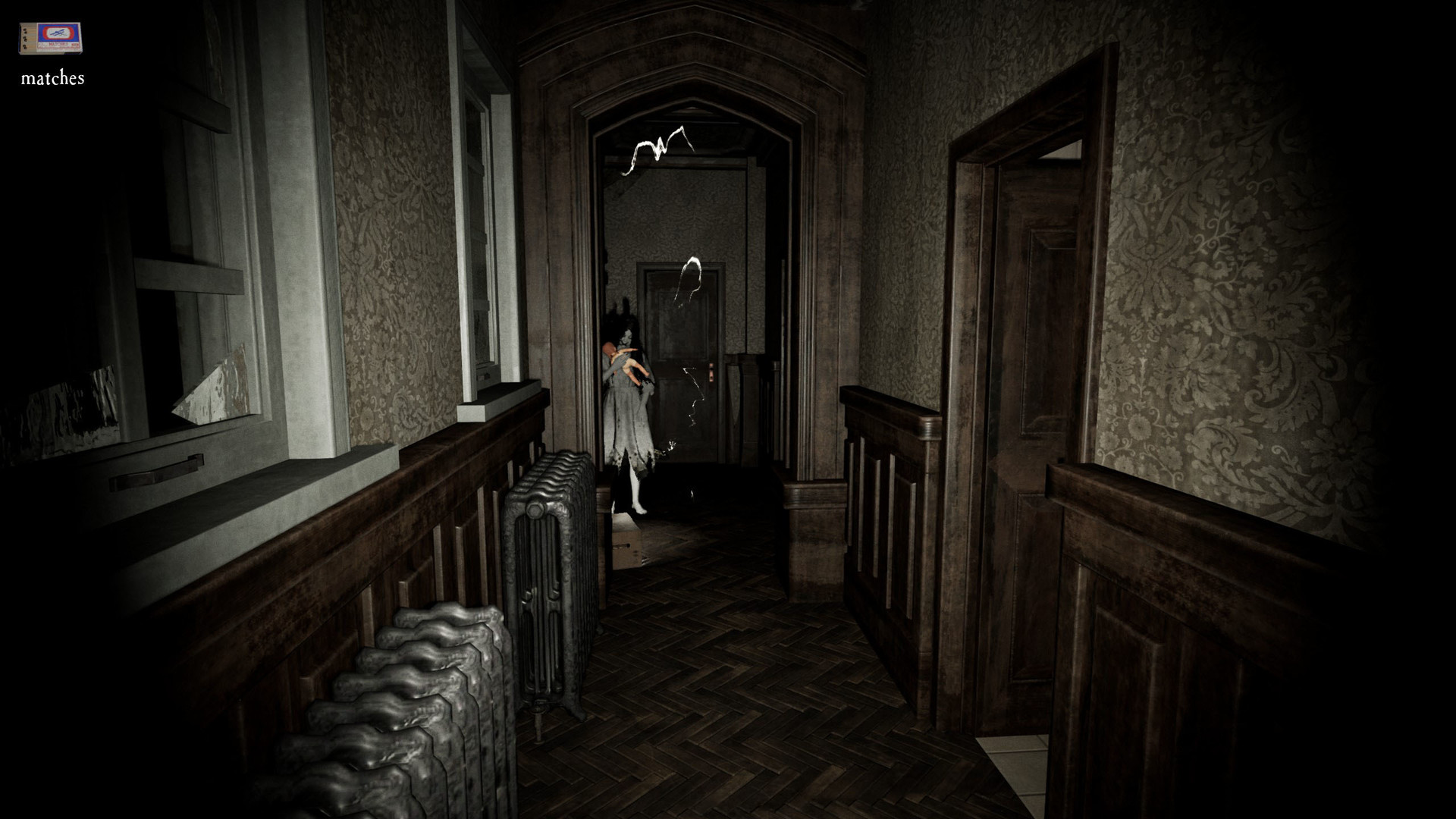
Pacify is a horror based multiplayer game developed by SKH Apps and Shawn Hitchcock for platforms like PC(Windows) and MAC.  This is a story based game where you have to collect evidence of supernatural activities and report it back to the headquarter. This game provides you with high-quality audio which you can experience it first hand if you are using a headphone.

The game contains 3 different modes to play. Though the story is the same but the gameplay is different than the others.

Single Player
Co-Op
PvP

Your job is to hunt and collect evidence around paranormal places like real ghostbusters. You are given the assignment to explore and collect the proof of any such activities. Somehow you stumble across an evil spirit who clearly don’t like any intruders.

Single Player
If you are up to the true horror and challenge, then play Solo and uncover the story alone. You will have to do all the work alone and the spirit will get more aggressive as you progress through the mission burning down the marked dolls. You can calm/fool the spirit by handing over the normal doll to pacify her anger.

The toughest challenge you face will be when there will be one last remaining cursed doll left. She can no longer be fooled by the same technique and will hunt you intensely at an extraordinary speed. Though the basement is by far the safest area but she can always follow if you lure her down.

Co-Op
You can invite your friends or randomly join any squad to encounter evil spirit residing inside “Emilia”. Complete the mission along with 3 more friends and explore all those rooms which are left to be explored when you have played in Single Player Mode.

The best thing about this mode is you can save your fellow teammate by interrupting the spirit from attacking your member and the workload can be divided among the other 3 individuals. You can also scare your friends and abandon them out of the room or inside a room alone(if you possess the key). You can always pull this prank as they can always be respawned back in the boiler room anytime.

PvP
Just like other modes you have to enter the mansion and collect the evidence. The only difference is that you all are an intern of PAH (Paranormal Activity Helper) Inc. competing against one another to get a full-time position.


The most scores accumulated by a player wins but you can all get in a way into one another by pushing them down and blocking their path. Pushing them down will momentarily stun them and dropping down any possession including keys and dolls. In this mode, if you become a doll, you can respawn yourself by collecting and lighting up the fire alone.

Do not trust anyone as they all fight for that only position and to survive. You will have to strategize in order to become a full-fledged worker and come in top.

buy pacify on steam : click here

Share:

Rainbow Six Siege Review: Very Worthy of Glance! | gamingtechno11

Rainbow Six Siege Review: Very Worthy of Glance!


There seems to be no more relevant sentence to explain the attitude that gamers should take for every multiplayer game that goes on the market besides taking a sentence that seems familiar if you are a loyal customer of a special bus in the capital city - Transjakarta. Every time you stop at one terminal and provide time for passengers to go up and down, it is always followed by a small warning "Carefully Step, Thank You" to make you more aware of the gap between the bus and the existing stop. This warning can also be directed at gamers to welcome the trend of multiplayer games that seem to be finding momentum in this one industry. Why? Because you could be consumed by the hype and end up with a thinner bag with an experience that doesn't feel satisfying.

With the performance of two multiplayer-based games in 2015 yesterday - Evolve and Star Wars Battlefront which we think did not end as well as expected, there is extra vigilance to taste more multiplayer games in the future. There are fears that the money you spend actually ends up bitter, whether because of the minimal content, developer support that just stops, or because the community that turns out also ends up not as satisfied and leaves this game in such a short time. This fear and pessimism also started our step into the tactical shooter game from Ubisoft - Rainbow Six: Siege. Regardless of the impression of the beta period that deserves thumbs up, there is a fear that it will end the same.

But fortunately, the first impression he offered was so strong. The two best plus points that we tasted at the beginning of the game were how competitive the competition system he offered was with an atmosphere of tactical which turned out to be still deeply rooted. He managed to escape the taste of the FPS game playing class like Call of Duty, even Counter Strike even with its unique appeal and gamepaly approach. This first positive impression kept us coming back despite the fact that he didn't offer much game mode in it.

So, what is actually offered by Rainbow Six Siege? Why do we call it a game that is very appropriate to look at? This review will discuss it more deeply for you.

Gameplay

Tom Clancy's Rainbow Six Siege is a first-person shooter game, in which players utilize many different operators from the Rainbow team. Different operators have different nationalities, weapons, and gadgets. The game features an asymmetrical structure whereby the teams are not always balanced in their ability choices.[3] The base Counter-Terrorism Units (CTUs) available for play are the American Hostage Rescue Team (referred to in-game as the FBI SWAT), the British SAS, the German GSG-9, the Russian Spetsnaz and the French GIGN, each of which has four operators per unit split between attackers and defenders (other units were later added through downloadable content, see below). Players also have access to a "Recruit" operator who can choose from a more flexible assortment of equipment at the expense of having a unique gadget or the ability to customize their weapon. Players can pick any operator from any unit that is defending or attacking before a round starts, choosing spawn points as well attachments on their guns but are not allowed to change their choices once the round has started. An in-game shop allows players to purchase operators or cosmetics using the in-game currency, "Renown", which is earned at the end of matches from actions performed in-game. Different gameplay modes award renown at different rates, with ranked matches offering the largest renown multiplier potential per match. Renown gain rate can also be affected by the addition of "boosters" which give the player a 100% increase in all renown earned for 24 real-time hours. A premium currency known as "R6 credits" can also be purchased using real-world currency to get operators quicker in-game, or other cosmetic.

In online matches, when a round begins the attackers choose one of several spawn points from which to launch their attack while defenders do the same from which to defend from. A one-minute preparatory period will then commence wherein the attackers are then given control over mecanum-wheeled drones to scout the map in search of enemy operators, traps and defensive set-ups as well as the target(s), while the opposition establishes their defences. Defenders can also put up destructible barricades and reinforced walls to make them indestructible to most munitions unless an appropriate operator, such as Hibana, Thermite, and Maverik, destroys it. Maps in the game are designed to encourage close quarters combat, and players cannot respawn until the end of a round. Players who were killed by opponents can enter "Support Mode", which allows them to gain access to drone's cameras and security cameras so that they can continue to contribute to their team by informing them of opponent locations and activities. Matches last only four minutes for a casual and three minutes for a ranked. Teamwork and cooperation are encouraged in Siege, and players need to take advantage of their different abilities in order to complete the objective and defeat the enemy team. Communication between players is also heavily encouraged. The game also has a spectator mode, which allows players to observe a match from different angles.

The game features a heavy emphasis on environmental destruction using a procedural destruction system. Players can break structures by planting explosives on them, or shoot walls to make bullet holes. Players may gain tactical advantages through environmental destruction, and the system aims at encouraging players to utilize creativity and strategy. A bullet-penetration system is featured, in which bullets that pass through structures deal less damage to enemies. In addition to destruction, players on the defending team can also set up a limited number of heavy-duty fortifications on walls and deployable shields around them for protection; these can be destroyed through breaching explosives or by utilizing operator specific gadgets like thermite.In order to stop attackers' advance, defenders can place traps like barbed-wire and explosive laser wire traps around the maps.Vertical space is a key gameplay element in the game's maps: players can destroy ceilings and floors using breach charges and can ambush enemies by rappelling through windows. Powerful weapons like grenades and breach charges are valuable, as only limited numbers can be used in a round.

Modes

At launch, the game featured 11 maps and 5 different gameplay modes spanning both PVE and PVP. With the downloadable content (DLC) released post-launch with an additional four maps from year one and three maps from year two – there are currently 19 playable maps with one more slated for release by December 2018. The gameplay modes featured include:

Hostage: a competitive multiplayer mode, in which the attackers must extract the hostage from the defenders, while the defenders must prevent that from happening either by eliminating all of the attacking team or successfully defending the hostage until the time expires. A secondary manner of winning can occur if the attacking or defending team accidentally damages the hostage, causing the hostage to "down"; if the opposing team can prevent the revival of the hostage, and the hostage bleeds-out and dies, they will win the round.
Bomb: a competitive multiplayer mode, in which the attackers are tasked with locating and defusing one of two bombs. The defenders must stop the attackers by killing all of them or destroying the defuser.If all attackers are killed after the defuser is planted, the defuser must still be destroyed for a defending victory.
Secure Area: a competitive multiplayer mode, in which the defenders must protect a room with a biohazard container, while the attackers must fight their way in and secure it. The match ends when all players from one team are killed or the biohazard container is secured by the attackers when there are no defenders in the room.
Tactical Realism: a variation of the standard competitive multiplayer modes, added with the release of the Operation Skull Rain DLC. The game mode features a heavier emphasis on realism and teamwork, removing most of the heads-up display (HUD) elements, the ability to mark opponents, and the ability to see teammates' contours through walls, while also featuring the addition of a realistic ammo management system. This mode is no longer in the game but some aspects are in the other multiplayer modes.
Terrorist Hunt: a solo or cooperative multiplayer mode for up to five players. Players take on the role of either attackers or defenders, and must fight against waves of enemies controlled by artificial intelligence across various modes like Bomb, Hostage or Elimination (Terrorist hunt classic).
Situations: the game's most significant single-player component, with 10 solo and 1 coop multiplayer missions that serve as introductory and interactive tutorials to the game's mechanics.
Outbreak: A limited time event exclusive to Operation Chimera, Outbreak pits a 3 player team in a co-op PVE environment against an alien biohazard threat, namely AI-controlled heavily mutated forms of humans infected with said alien parasite. Two difficulties exists for this mode, for which the chief difference was the inclusion of friendly fire on the harder one.
Setting

Angela Bassett performed voice works and motion capture for Six, the director of Team Rainbow.
Three years after the Rainbow Program's deactivation, there is a resurgence of terrorist activities, with the White Mask being the most prominent. The terrorists' goals are unknown, yet they are causing chaos across the world. To counter this rising threat, the program is reactivated by a new leader who is simply known as Six (voiced by Angela Bassett). Six assembles a group of special forces operatives from different countries to face and combat the White Masks. Recruits go through multiple exercises to prepare them for future encounters with the White Masks, training to perform hostage rescue and bomb disposal. Eventually, the White Masks launch a chemical attack on a university (called Bartlett University), and the recruits are sent to disarm the bombs and eliminate the enemy presence. The operation is a massive success, though there are casualties. The story ends with Six affirming that the reactivation of Team Rainbow is the best and only choice in a time filled with risks and uncertainties. Team Rainbow is ready for their next mission – to hunt down the leader of their enemy – and they stand prepared to protect and defend their nation from terrorists.


Development

See also: Tom Clancy's Rainbow 6: Patriots
This entire project was born and has grown out of an in-depth study that looked to distill what the Rainbow series is at its core in terms of both fantasy and gameplay. At the end of the day, the Rainbow Six fantasy about being part of the greatest counter-terrorist organization and impersonating the best of the best operators, working as a team, and carrying out dangerous operations (hostage rescue) anywhere on the globe

— Andrew J. Witts, game designer of Rainbow Six: Siege
The game's predecessor was Tom Clancy's Rainbow 6: Patriots, a tactical shooter announced in 2011. It had a focus on narrative, and the story campaign features many cut-scenes and scripted events. However, the game fell into a development hell shortly after its announcement. The game's outdated engine and frequent change of leadership hindered development progress, and game quality was not up to par. In addition, it was planned to be released on seventh-generation video-game consoles which were not capable of processing certain game mechanics. Seeing the arrival of a new generation of consoles, the team wanted to make use of this opportunity to create a more technologically advanced game. As a result, Ubisoft decided to cancel Patriots and assembled a new team of 25 people to come up with ideas to reboot the series.

To make the new game feel refreshing, only certain multiplayer elements were retained as the small team took the game in a different direction. They evaluated the core of the Rainbow Six series, which they thought was about being a member of a counter-terrorist team travelling around the globe to deal with dangerous terrorist attacks – operations which are usually intense confrontations between attackers and defenders. However, the team wanted to fit these ideas into a multiplayer format which would increase the game's sustainability. These became the basic concept ideas for the game. As the development team hoped that the game can be replayed frequently, the team decided to devote all the resources into developing the game's multiplayer and abandoned the single-player campaign.

Development of the game officially began in January 2013. Ubisoft Montreal, the developer of Patriots, handled the game's development, with Ubisoft's offices in Barcelona, Toronto, Kiev, Shanghai and Chengdu providing assistance. The game was originally called Rainbow Six Unbreakable, a title that reflected not only the game's destruction mechanic but also the mindset of the development team, who had to deliver a game that was once stuck in development hell. According to Alexandre Remy, the brand director, the team was confident in their new vision for the game but very nervous when they revealed it, realizing the change of direction would likely disappoint some fans.


Design

The 150-person team consisted mainly of first-person shooter veterans or longtime Rainbow Six players. Despite having prior knowledge on how these types of games work, the team decided to study historic examples of counter-terrorist operations, including 1980's London Iranian Embassy siege, 1977's Lufthansa Flight 181 hijacking, and 2002's Moscow theatre hostage crisis to ensure that the portrayal of these operations was accurate and appropriate. The team also consulted counter-terrorism units, such as the National Gendarmerie Intervention Group (GIGN), for their opinions on how they would react during a hostage rescue situation. According to Xavier Marquis, the game's creative director, having a hostage rescue mission in the game helped create an immersive story. By allowing players to assume control of an operator tasked with saving innocents, it gives them an objective and a priority. They must be careful in dealing with the situation and try their best not to hurt the hostage. This further promotes teamwork between players and prompts them to plan before attacking, and further makes the game more realistic, tense and immersive. To make the game feel more realistic, the team introduced a mechanic called "living hostage" to govern the hostage character's behaviour – e.g., coughing if there is dust in the air or shielding him or herself if there is nearby gunfire.

The environmental destruction mechanic was one of the game's most important elements. When the game's development was begun, the developer's in-house team completed their work on RealBlast Destruction, an engine that "procedurally breaks everything down" and remodels the environment.The development team thought that this technology fitted the game's style and gameplay, and decided to use it. This aspect of the game became increasingly important during development, and the team spent an extended period of time making sure that these destructions were authentic. As a result, the team implemented a materials-based tearing system, in which environmental objects of different materials show different reactions to players' attacks. To render the game's texture, the team used physically based rendering, even though it was ineffective during the game's early stage of production due to issues with the game's engine. A material bank and substance painter were utilized to create textures for environmental objects when they were damaged or destroyed. The team also implemented subtle visual cues to help players identify whether a structure was destructible or not, as opposed to "distracting" players with more-obvious hints. The destruction mechanic prompted Ubisoft to change their level-design approach, as they had to ensure that the level was still logical and realistic when parts of the environment were destroyed.

According to Ubisoft, "teamwork, tactics, and tension" were the game's three most important pillars. The team initially worked on a respawn feature, allowing players to rejoin after they are killed in the game. However, following several internal tournaments, the team realized that some of their employees would always win a match. They concluded that the respawn system worked to the benefit of strong players and placed individual skill above teamwork, which did not fit the developer's focus on game tactics. Removing the respawn feature meant greater consequences for taking risks, and players had to rely on their teammates in order to survive and achieve objectives. According to Chris Lee, the game's designer, the team initially worried that the system would only appeal to hardcore players. However, after several testings, they found that the removal of the respawn system provided new challenges to strong players and forced them to cooperate with their teammates – while it rewarded weaker players who were willing to take their time, plan their actions, and be strategic.

The gameplay system was designed to allow players to have a lot of freedom. As a result, the team implemented the "Golden 3C Rules", which represents Character, Control, and Camera. Players are always controlling their own actions and movements, and the team intentionally avoided any animation that would disrupt the players. As a result, actions such as setting explosives, or placing a breach charge, can be cancelled immediately so that players can react and shoot. The game's camera only moves when the player moves, as the team feared that the changes of camera angle may lead to players' in-game deaths. A free-lean system was introduced to the game so that players can have more control over their line of sight. According to Ubisoft, this input-driven control mechanism makes the game feel more "natural" and "fluid". This is because it allows players to concentrate on planning and coordinating, rather than thinking if the camera or environment will interfere with their actions.

Several gameplay elements were scrapped or removed from the final game. One of the features of its predecessors, artificial intelligence-controlled squadmates, were removed from single-player missions. This decision was made because the team wanted players to play with a squad controlled by actual players rather than computers. The team once considered adding a map editor so that players could design their own maps, but this plan never came to fruition. Hit markers, which would indicate an injury inflicted on an opponent, were removed because the team feared that players would abuse the system by "peppering the walls with gunfire" and use hit markers to locate enemies. Players cannot jump in the game, as real-life counter-terrorist unit operators do not jump while carrying out their missions.

According to Louis Philippe, the game's audio director, the team originally used intense music and sounds to create tension. However, the team decided to scrap this idea, realizing that the best way to create a tense atmosphere is to create the sounds of other players, which are often unexpected. The team created Navigation Sounds, in which the sound a player made is determined by their operators' weight, armour, and speed. Gadget deployment such as fortifying and breach-charging create louder sounds that may reveal the player's presence. The team thought that this would be enjoyable for players and influence their gameplay experience. The game's music was composed by Paul Haslinger, who had worked on the score of the previous Rainbow Six games and the Far Cry series. His co-composer was Ben Frost, who debuted his first video game soundtrack with Siege. Leon Purviance assisted Frost and Haslinger in composing the music.

Release


Ubisoft announced the game at their press conference during Electronic Entertainment Expo 2014. In August 2015, Ubisoft announced that they had delayed the game's release from October 10 to December 1, 2015, in order to give additional time for the team to balance the game for cooperative multiplayer play. A closed alpha-testing was held by Ubisoft on April 7–13, 2015, in which players could play an early version of the game in order to help the development team test their servers and core gameplay loops, and to provide feedback. Ubisoft held a closed beta, starting on September 24, 2015, for further testing. The company originally wanted to hold another round of testing with the release of the game's open beta on November 25, 2015, but they delayed its release to November 26 due to matchmaking issues. Players who purchased Siege for the Xbox One could download Tom Clancy's Rainbow Six: Vegas and its sequel, Tom Clancy's Rainbow Six: Vegas 2 for free. To launch the game in Asian markets, Ubisoft announced plans to remove graphic imagery from all versions of the game via a patch.  The plan was later withdrawn by the developer due to review bombing and negative fans feedback.

The game had multiple versions for players to purchase. A season pass was announced on November 12, 2015. Players who bought this version of the game could gain early access to operators offered in the DLCs and receive several weapon skins. The game was also released alongside its Collector's Edition, which included the game's season pass, a hat, a compass and bottle opener, a backpack, and a 120-page guide. A Starter Edition was released on PC in June 2016, featuring all content offered in the Standard Edition, and included two operators at start for use plus enough Rainbow 6 Credits to purchase up to two more of the player's choice while the rest has to be purchased through either Renown at an increased cost or additional Rainbow 6 Credits. The Starter Edition was cheaper than the Standard Edition and was initially available for a limited time.In February 2017, the Starter Edition became permanently available via Uplay.

According to Ubisoft, the game adopted a "game as a service" approach, as they would provide long-term support for the game and offer post-release content to keep players engaged. The management team initially doubted the idea but eventually decided to approve it. The title was supported with many updates upon launch, with the company introducing fixes to bugs and improvements on both matchmaking and general gameplay mechanics. They also introduced an auto-kick system, which automatically removes players from a match when they kill friendly player and launched the BattleEye system in August 2016 to punish cheaters. All downloadable content maps were released to all players for free. The team avoided adding more modes to the game because most would not fit well with the game's close-quarter combat. Downloadable content for the game was divided into several seasons, with a Mid-Season Reinforcement patch which added new weapons and modified some of the operators' core abilities. This post-release content was developed by the Montreal studio in conjunction with Blue Byte in Germany.Ubisoft announced that they would keep supporting the game and adding new playable characters for 10 more years. As a result, no sequel was planned.To counter toxicity within the game's community, in mid 2018 Ubisoft began issuing bans to any player who has used racist and homophobic slurs.

In January 2018, Ubisoft announced the introduction of 'Outbreak Packs', which are loot boxes that can be unlocked with R6 credits (which can be purchased with microtransactions) to gain character items. The company also announced that the base version of the game will be replaced by a bundle named The Advanced Edition, which includes the base game and a small number of outbreak packs and R6 credits. The changes resulted in players' backlash, as existing players have to pay for new content while new players do not. Ubisoft compensated players by giving players a free premium skin for free and announced plans to change the Standard Edition so that players can unlock new operators at a faster pace. In July 2018, Ubisoft announced the introduction of a limited time pack named 'Sunsplash Packs', which are available to purchase with R6 credits and contain cosmetics that have an association with the season of Summer. In October 2018, Ubisoft unveiled the Crimsonveil packs, which added a Halloween themed weapon skin, charm, headgear, and uniform for 4 operators, plus a seasonal weapon skin and a charm that was themed with the skin.

Ubisoft also envisioned the game as an esports game. The company had their first meeting with David Hiltscher, vice president of ESL, in late 2013. ESL offered feedback on the game's balancing and helped the developer to ensure that the game was suitable for competitive play. The team focused on introducing new operators to provide variety for esports viewers after the game's release, a decision inspired by modern multiplayer online battle arena games such as Dota 2, as this type of game often has 80–100 playable characters. ESL and Ubisoft officially announced Tom Clancy's Rainbow Six Pro League, a global tournament for Windows and Xbox One players. The competition was held at Intel Extreme Masters eSports tournament on March 4, 2016. A European team, PENTA Sports, became the champion of the first season of Rainbow Six Pro League after defeating another team, GiFu, at the final of the tournament held in May 2016. In 2017, it was revealed that Pro League Year Two would return, but Xbox One tournaments would not be featured. Ubisoft also held the Six Invitational tournaments in 2017 and 2018, in which top teams competed for the top prize. The 2018 tournament attracted 321,000 viewers on Twitch. Both Nathan Lawrence from Red Bull and Richie Shoemaker from Eurogamer compared the game favourably with Counter-Strike: Global Offensive, with both being hopeful that Siege can dethrone Global Offensive's status as the most successful competitive esports first-person shooter in the future. Rainbow Six Siege Year 3 Season 4 was announced on November 18 at the Pro League Finals in Rio de Janeiro and is set in Morocco.

Share:

Popular Posts

Recent Posts